
Covered Call Screener & Calculator Tools: Best Free & Paid Options (2026)
A covered call screener ranks the calls you could sell against your shares by annualized return, assignment probability, days to expiration and liquidity, so you don't have to read every option chain by hand. Our free covered call screener does that for the tickers you enter and shows each call's return if assigned and its assignment chance next to the annualized return. The scan box sits at the top of our homepage, and the same scan runs in the Strategy Analyzer. For market-wide idea lists, the main alternatives are Barchart, Market Chameleon, Option Samurai and Born To Sell, and a covered call calculator then checks the one trade you pick.
I build Days to Expiry, so read the comparison below with that in mind. For third-party tools I only list what their own pages said when I checked them on 24 September 2026, with links, so you can confirm it yourself.
Screen your tickers now: enter them in the scan box on our homepage, then start a trial to track rolls and true cost basis in your portfolio.
Watch the short
What a covered call screener should show
Every screener dresses its table differently, but the useful ones compute the same handful of numbers for each call. If a tool doesn't show these, you end up doing the math in a spreadsheet anyway.
| Metric | Formula | What it tells you |
|---|---|---|
| Premium | Option bid × 100 | Cash you receive per contract |
| Static return | Premium per share ÷ stock price | Return if the stock doesn't move |
| Annualized return | Static return × (365 ÷ DTE) | Lets you compare different expirations |
| Return if assigned | (Strike − stock price + premium) ÷ stock price | Your full return if the shares are called away |
| Breakeven | Stock price − premium per share | Where the combined position starts losing |
| Distance to strike | (Strike − stock price) ÷ stock price | Upside room before the call is in the money |
| Assignment probability | Delta, or a model's probability of finishing in the money | How likely you are to lose the shares |
| Liquidity | Bid-ask spread, volume, open interest | Whether you can actually trade at the quoted price |
Annualizing is the one that changes decisions. Say one call pays 2% in 14 days and another pays 4% in 60 days. Annualized, that's 2% × 365 ÷ 14 ≈ 52% against 4% × 365 ÷ 60 ≈ 24%. The smaller premium is the more efficient trade, as long as you'll actually repeat it every two weeks.
The filters that matter
Most screeners offer dozens of filters. These are the ones that decide whether a result is worth a second look.
Annualized return. Sort or filter on this, not raw premium. But treat a very high number as a warning. It usually means the strike sits close to the stock price, implied volatility is high because something is coming up, or both.
Assignment probability or delta. This is the dial between income and keeping your shares. A higher probability pays more and gets you called away more often. Pick the range from how you feel about selling the stock at the strike. If you'd be unhappy to lose the shares, stay at the low end.
Our screener uses the call's delta from the data provider when the option chain includes one. If it doesn't, it falls back to a Black-Scholes N(d2) estimate from that contract's own implied volatility. Either way it's an estimate of the odds, not a forecast.
Days to expiration. Shorter expirations decay faster and need more attention. Longer ones pay more in dollars but less per day. There's no single right answer, and it mostly depends on how often you want to manage positions. The trade-offs are in covered calls by expiration.
Stock price versus your capital. A covered call needs 100 shares. On a $200 stock that's $20,000 per contract, so filter out anything your account can't hold in 100-share lots without putting most of it in one name.
Implied volatility relative to the stock's own history. A call on a stock whose IV is high for that stock pays more than usual. IV rank and IV percentile measure this, and they often disagree; IV rank vs IV percentile explains why.
Earnings and ex-dividend dates. An earnings report inside your expiration inflates the premium and adds gap risk. An ex-dividend date raises the chance of early assignment on calls that are in the money, because the holder may exercise to collect the dividend. Check both before you trust a high yield.
Liquidity. A wide bid-ask spread costs you on the way in and again when you roll or close. If the spread is a big share of the premium, skip the trade whatever the yield says.
How to read screener output
Here's what a filtered result set can look like. The tickers and prices are hypothetical, made up to show the arithmetic.
| Stock (hypothetical) | Price | Strike | DTE | Premium | Static return | Annualized | Distance to strike | Note |
|---|---|---|---|---|---|---|---|---|
| Stock A | $50 | $52.50 | 30 | $0.90 | 1.80% | 21.9% | 5.0% | No events before expiration |
| Stock B | $48 | $50 | 28 | $1.40 | 2.92% | 38.0% | 4.2% | Earnings in 9 days |
| Stock C | $95 | $100 | 35 | $1.10 | 1.16% | 12.1% | 5.3% | Very liquid, low IV |
Each row uses the formulas above. For Stock A: $0.90 ÷ $50 = 1.80%, and 1.80% × 365 ÷ 30 = 21.9%. Distance to strike is ($52.50 − $50) ÷ $50 = 5.0%.
Sort by annualized return and Stock B comes out on top. It's also the only one with an earnings report before expiration, and that's probably where most of the extra premium comes from. The market is pricing a bigger move, and you're the one taking it. Stock A pays less, has more room to the strike, and has nothing scheduled.
That's the main reason yield-only sorting fails. The top row is often the riskiest ticker in the list. So run the filters, sort by annualized return, then work down the list and cross off anything with an event before expiration, a wide spread, or a stock you wouldn't want to own.
The Days to Expiry covered call screener
The scan box is at the top of our homepage. Here's how it looked on 24 September 2026, with the default settings for covered calls:
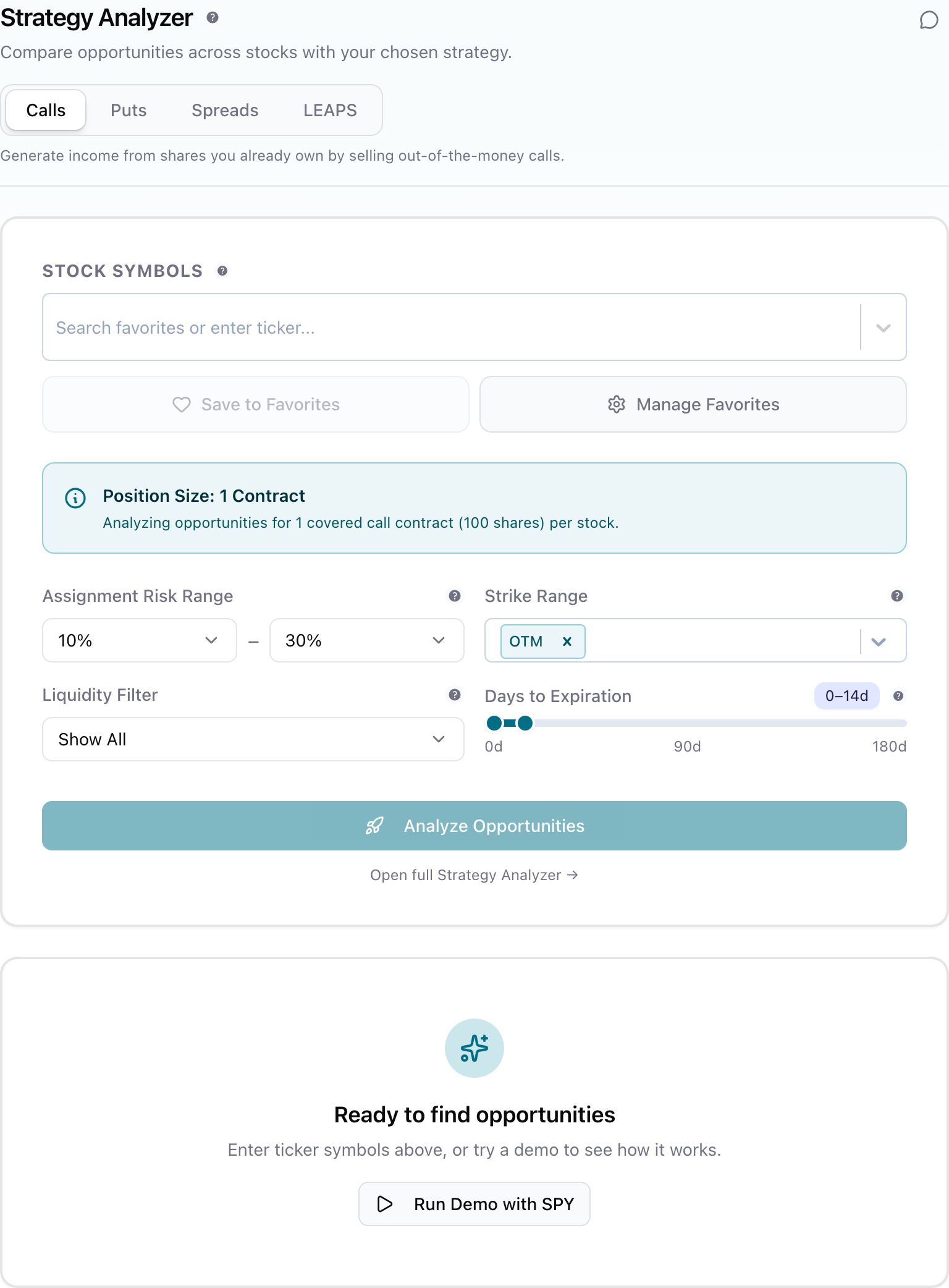 Days to Expiry covered call screener input panel with stock symbols, assignment risk range, strike range, liquidity filter and days-to-expiration slider
You enter the tickers you own or want to own. (The same scan also runs in the Strategy Analyzer.) The Calls tab then scans those symbols' calls (out of the money by default) within your assignment-risk range (10% to 30% by default, as in the screenshot), your strike range and your DTE window, with an optional liquidity filter. Each result shows:
- 7-day ROI and annualized return, using (premium ÷ capital) × (365 ÷ DTE)
- Return if assigned, including the gain from the current price up to the strike
- Assignment chance, the provider's delta where the chain has one and the N(d2) estimate otherwise, next to the contract's IV
- Capital needed for one contract, distance OTM, a trend reading and the 52-week range
- Liquidity tier, with bid, ask, spread and volume in the tooltip
- History, a summary of your own past trades on that ticker if you have any in the app
The main limitation is that it scans the tickers you give it. It doesn't search the whole market for the highest-yielding call on a stock you've never heard of. For covered calls I think that's the right way round, since you should only sell calls on shares you're happy to hold. But if you want a market-wide idea list, use one of the tools below alongside it.
Anonymous visitors get a daily allowance of free scans. After that it asks you to sign up, and the trial adds portfolio tracking, so you can see a position's cost basis after rolls instead of only the premium from the latest call.
Other covered call screeners (as of September 2026)
These are the covered call screeners I checked. Each description sticks to what the vendor's own page said when I checked it on 24 September 2026. Prices change, so confirm them on the linked page before you subscribe.
| Tool | What it is | Access and price (checked 24 Sep 2026) |
|---|---|---|
| Barchart covered calls screener | Market-wide screener with potential return (if assigned) and annualized potential return columns | Options data delayed at least 15 minutes. Adding or changing filters needs Premier; Premier members also get up to 100 CSV downloads a day and end-of-day emailed results |
| Market Chameleon covered call screener | Screener with delta, option IV rank, breakeven, downside cushion and % return if flat | Filters and download need a premium subscription; free one-week trial |
| Option Samurai | General options scanner covering 24 strategies, including covered calls, with ready-made scans | Beginner $39/month and Advanced $59/month, both when paid annually; two-week trial, no card needed |
| Born To Sell | Covered call screener plus portfolio management, earnings and dividend calendar | $59.95/month, $149.95/quarter or $499.95/year, same features on every plan; two-week trial, card checked up front but not charged until day 15 |
| Your broker's option chain | One ticker at a time, with live quotes if your account has them | Free with the account |
| Days to Expiry | Screener for the tickers you enter, with a delta-based assignment chance and return if assigned | Free daily scans; sign-up for more |
A few notes on how these differ in practice.
Barchart gives you a market-wide list. Its help page says Premier subscribers can add or modify the screener's filters, and it describes saved screeners, CSV downloads of up to 1,000 results and end-of-day emails of results for Premier members. A 15-minute delay is fine for planning a trade you'll place later, but don't trade straight from the table.
Market Chameleon shows IV rank and a "% return if flat" column in the table itself, which saves you two calculations. You need the paid subscription to filter and download. There's a longer comparison in Market Chameleon alternative.
Option Samurai is a general scanner. It's the better fit if you also want to scan spreads, iron condors or other strategies with the same tool.
Born To Sell is built around covered calls specifically and adds portfolio tools on top of the screener. We also have a Born To Sell comparison.
Broker chains are where you should confirm the live bid and ask before placing any trade, whichever screener found it. They're slow as a discovery tool because you check one stock at a time.
Covered call calculators
A calculator checks the single call you picked from the screener. Before you sell, you want the premium, breakeven, static return, return if assigned and annualized return for that specific strike and expiration.
Our covered call calculator starts from the capital you want to put to work:
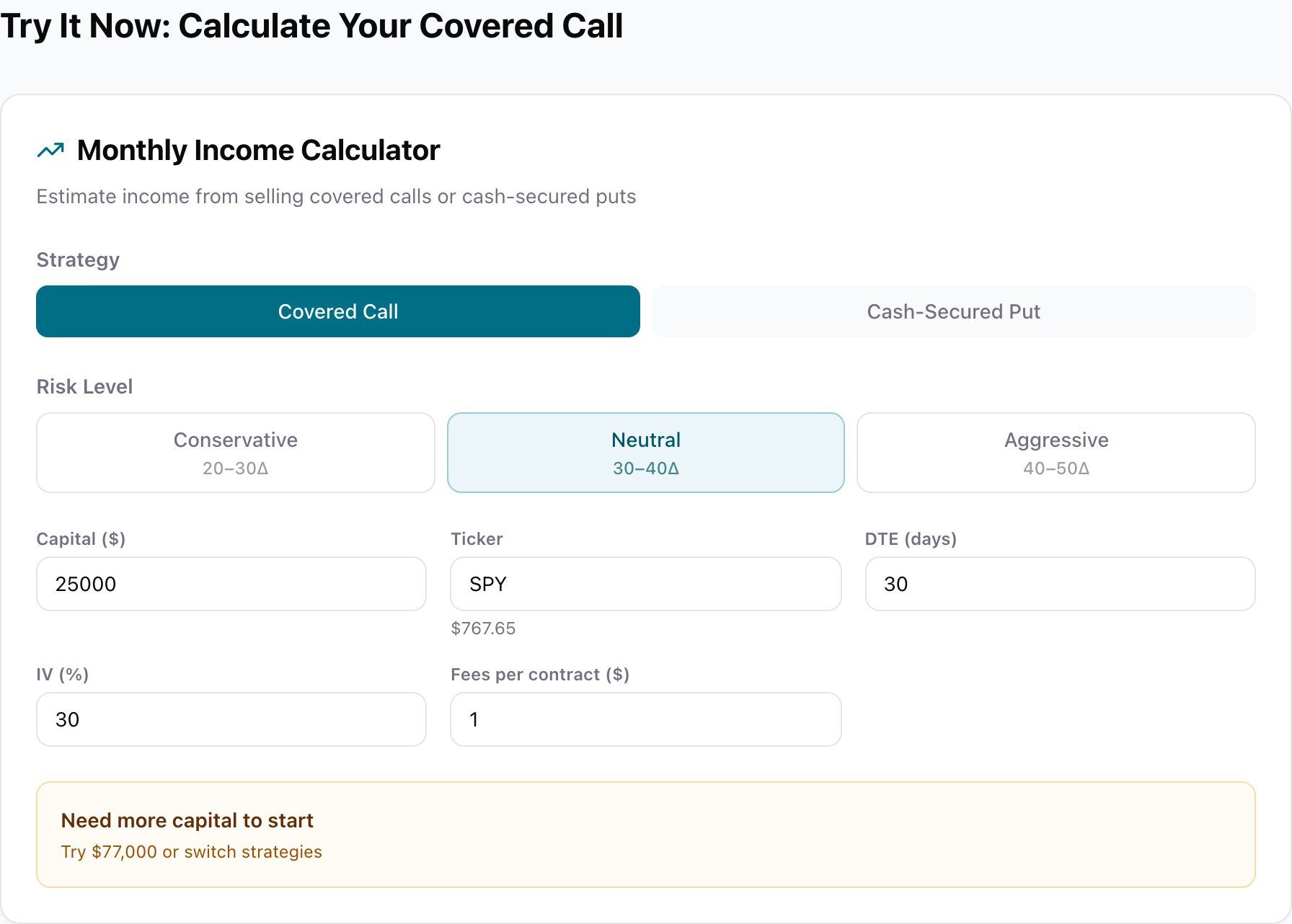 Days to Expiry covered call calculator with strategy, risk level, capital, ticker, DTE, IV and fees-per-contract inputs
You set capital, ticker, DTE, IV, fees per contract and a risk level. The risk level only sets the delta range passed along when you open the setup in the Strategy Analyzer. The calculator's own strike is always 2% above the current price. It returns the strike, premium per contract, number of contracts, monthly income, annual yield and breakeven. The premium is tagged Live when it comes from a real quote and Estimated when it's derived from your IV input, so check which one you're looking at. In the screenshot the default capital can't cover 100 shares of SPY, so it says how much you'd need instead.
It doesn't show return if assigned, so work that one out by hand.
The calculation most people get wrong is max profit, which is the premium plus the stock's gain up to the strike.
Here's a hypothetical trade. You bought 100 shares at $150, the stock is still at $150, and you sell a 30-DTE $155 call for $1.50.
Premium            = $1.50 × 100                         = $150
Static return      = $1.50 ÷ $150                        = 1.0%
Annualized         = 1.0% × 365 ÷ 30                     ≈ 12.2%
Max profit         = ($155 − $150) × 100 + $150          = $650
Return if assigned = $650 ÷ $15,000                      ≈ 4.3%
Breakeven          = $150 − $1.50                        = $148.50
These are before fees. Subtract your broker's commission to open, and any fee to close or on assignment, from the $650 and the $150. If the stock finishes above $155, you keep $650 and the shares are gone. If it sits still, you keep the $150 and still own the shares. Below $148.50, the combined position is losing money.
For multi-strategy work, the Strategy Analyzer compares covered calls and cash-secured puts side by side, the Greeks calculator works out delta, gamma, theta and vega for a single option, and the wheel strategy calculator covers the full put-then-call cycle.
A weekly screening routine
A screener only helps if you use it the same way every time. A simple routine:
- Run your saved scan on the tickers you hold or are happy to buy, with the same assignment range, DTE window and liquidity filter each week.
- Sort by annualized return, then work down the list instead of taking the top row.
- Cross off anything with earnings or an ex-dividend date before expiration, a wide bid-ask spread, or a stock you wouldn't want to keep holding.
- Check the survivors in a calculator, including your fees, so you know the breakeven and the return if assigned.
- Confirm the live quote in your broker's chain and place the trade there.
- Decide your exit before entry: when you'll close early, when you'll roll, and when you'll let the shares go. Rolling covered calls and the 21 DTE rule cover the management side.
Which tool fits which trader
You write calls on a few stocks you already own. A free screener that scans your own tickers plus a calculator covers the job. That's the case our screener is built for.
You want new ideas from across the market every day. A market-wide screener earns its place here, but expect to pay for the parts you'd use daily. Barchart needs Premier to add or change filters and to email you results. Market Chameleon needs a subscription to filter and download. Option Samurai can watch a scan during the day and notify you when a new trade appears, and Born To Sell includes email alerts; both are paid after a two-week trial. Use the free trials to see whether you actually open the tool more than once a week before you pay.
You run the wheel or mix covered calls with other income trades. You'll want a tool that also screens cash-secured puts and keeps track of cost basis after rolls and assignments. See the wheel strategy guide for how the pieces fit together.
The bottom line
A covered call screener is worth using when it shows annualized return, return if assigned, assignment probability and liquidity side by side, and you sort by annualized return but decide on everything else. Start with the stocks you'd be happy to own. Run them through the scan box on our homepage, check the pick in the covered call calculator, and add a market-wide tool only if you really need more ideas than your own watchlist gives you.
Related Articles
- How to Sell Covered Calls: Step-by-Step Income Guide
- Covered Calls by Expiration: Weekly vs Monthly
- Rolling Covered Calls
- Covered Call Tax Rules
- Market Chameleon Alternative
- Options Screener: How to Find, Filter, and Rank Trades
- The Wheel Strategy Guide
- IV Rank vs IV Percentile
- The 21 DTE Rule
- Gamma Risk Near Expiration
This guide is for education only. Options trading involves risk of loss, and nothing here is a recommendation to buy or sell any security.
Frequently Asked Questions
Written by Florian Strauf
Continue Your Journey
Covered Call Analyzer
Find the best covered call opportunities.
Cash-Secured Put Calculator
Calculate put selling returns.
Demo Portfolio
Explore a sample portfolio with positions and strategy insights — no login required.
Wheel Strategy Calculator
Plan your wheel trades.
Free scanner account
Scan free — then add the full workflow
- Live broker sync (33+ supported brokers; daily auto-refresh for IBKR Flex)
- Portfolio Scanner for comprehensive recommendations
- Strategy backtesting for covered calls and puts
- Full wheel backtesting with buy‑and‑hold comparison